Why Yesterday’s Guardrails Won’t Hold Tomorrow’s Agents
Some organizations are not new to credential risk at scale. They have run HashiCorp Vault in production for years. They have retired static secrets, automated rotation, and built centers of excellence around identity and access. If your AI governance pitch to an infrastructure-mature enterprise starts with “here is how to manage secrets at scale,” you have already lost the room.
The real gap for these organizations is not scale. It is speed. AI-operational enterprises have mastered running infrastructure at enterprise volume. What they have not mastered is governing decisions made by autonomous agents at machine speed, where a workflow can act, escalate, and move on before a human ever sees it.
That gap is the actual conversation infrastructure-mature organizations want to have right now. Here is what it takes to have it well.
Maturity is Assumed
Organizations that have been operating at scale for years do not need a primer on why credentials should not be hardcoded. They built that discipline a long time ago. Positioning a security conversation around static or even dynamic secrets treats a highly mature buyer like a beginner, and mature buyers disengage fast when that happens.
The more useful frame acknowledges what the organization has already built, then asks the next question: your governance framework was designed for infrastructure that people configure. Is it built for infrastructure that agents operate?
That reframe changes the entire conversation. Instead of “how do you protect secrets,” the question becomes “how do you govern autonomous decisions.” Those are different problems with different failure modes, and most governance frameworks in production today were never designed for the second one.
The Governance Gap Is Architectural, Not Procedural
Infrastructure-mature enterprises already run committees for risk, compliance, and architectural review. The instinct is to assume agentic AI just needs another line item on an existing checklist. It does not.
Agent-driven workflows introduce a different risk surface:
Decision velocity outpaces human review. An agent operating at enterprise scale is not making one decision a human can audit in real time. It is making millions. Governance has to be designed into the architecture, not layered on as a review step after the fact.
Just-in-time credentials are necessary but not sufficient. Dynamic, short-lived credentials issued through HashiCorp Vault reduce blast radius when an agent is compromised or misbehaves. But credential hygiene alone does not answer the harder question: what is this agent authorized to decide, and how do you prove it stayed within that boundary after the fact?
Auditability has to be built for replay, not just logging. When a regulator, auditor, or board member asks “walk us through what the agent decided and why,” a log file is not an answer. Event-driven auditability, the kind that platforms like Confluent are built for, lets an organization reconstruct an agent’s decision path end to end. That reconstruction is the actual compliance artifact, not the fact that logging existed.
Vault is now an architectural decision, not an infrastructure one. Treating HashiCorp Vault as a secrets vault undersells what it does in an agentic environment. The real question it answers is how you design workflows so that a compromised or misbehaving agent has the smallest possible blast radius by design, not by luck.
What “Mature” Looks Like for a Governance Conversation
The instinct with a sophisticated buyer is to assume they need less explanation. The opposite is closer to true: they need a more specific one.
A useful governance conversation with an infrastructure-mature organization covers three concrete pillars, not a generic AI risk overview:
- An enterprise AI architecture north star. Does the organization have a defined end state for where agent autonomy is heading, whether that is autonomous engineering operations, an advisory layer for a customer-facing function, or something narrower? Without a stated target, governance conversations default to reactive risk management instead of proactive design.
- AIOps maturity at machine speed. Traditional observability answers “what happened.” Machine-speed observability has to answer “what is this agent about to do, and should it be allowed to.” That is a different tooling and process requirement, and most organizations have not built it yet even when their infrastructure observability is excellent.
- Automation as a discipline, not a toolset. Declarative, immutable infrastructure is the foundation that makes governance enforceable instead of aspirational. An organization that has already invested in open-source infrastructure automation is closer than it thinks, but the transition to enterprise-grade tooling often becomes necessary exactly when agent autonomy increases, because the guardrails need to be provable, not just present.
Lead With the Pain Point, Not the Product
The strongest version of this conversation never opens with a product name. It opens with a question: where do you feel the pain in AI governance today? Is it FinOps and token economics? Is it security and root-of-trust strategy? Is it operational visibility once agents start making autonomous decisions?
The product conversation comes second, and it comes framed around the pain the buyer already named. A Terraform-driven, cost-aware architecture is a stronger pitch after a FinOps pain point has been established than as an opener. The same is true of Vault’s dynamic identity model after a root-of-trust conversation, or Confluent’s event streaming after an auditability conversation. Sequence matters as much as content.
The Regulatory Reality Nobody Wants to Say Out Loud
Regulators and internal audit functions are not proactively enforcing AI governance standards today. They are reactive: they show up after something goes wrong, ask what framework was followed, and expect a specific answer. That dynamic means organizations that build a defensible governance model now are the ones with an answer ready when, not if, that question comes.
This is also where the acknowledgment matters most. Infrastructure-mature enterprises are not starting from zero. They already have governance committees, architectural review boards, and risk frameworks in place. The gap is not the absence of governance. It is that yesterday’s governance frameworks were built for yesterday’s infrastructure, and agents change the assumptions those frameworks were built on.
The Takeaway for AI-Operational Organizations
If your organization has already retired static secrets, automated credential rotation, and built a mature root-of-trust strategy, the next governance conversation is not about doing more of the same, faster. It is about redesigning governance for a system that makes autonomous decisions instead of one that simply executes configured instructions.
That distinction, more than any single tool, is what separates organizations that are ready for the next wave of agentic AI from those that are patching yesterday’s framework onto tomorrow’s workload.
River Point Technology works with infrastructure-mature enterprises to translate AI governance strategy into deployable architecture, combining HashiCorp Vault’s identity and access model with the broader IBM ecosystem for auditability, cost governance, and compliance. Explore RPT’s approach to security and compliance, or connect with our team to assess where your current governance model has gaps your infrastructure has already outgrown.
Kevin Hospodar is Sr. Director of Go-To-Market at River Point Technology, where he leads go-to-market strategy across sales, marketing, and partnerships for RPT’s HashiCorp and IBM practices. He works closely with AI-operational enterprises navigating the shift from infrastructure automation to agentic AI governance. Connect with him on LinkedIn.
Ninety-two percent of organizations reported an AI-related breach and lacked proper AI access controls. That number, from IBM’s 2026 Cost of Data Breach Report, should stop every technology leader mid-scroll. It is not a story about AI failing to deliver value. It is a story about AI outrunning the guardrails built to manage it.
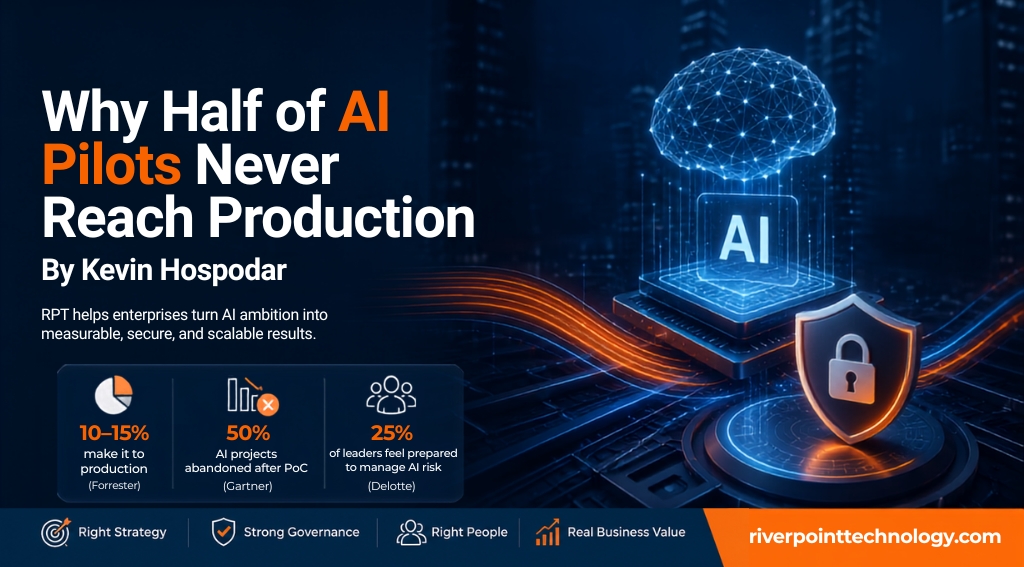
Here is the paradox we see with nearly every client conversation right now: the appetite for AI has never been higher, and the ability to operationalize it has never been more strained. Thirty-four percent of companies are using AI to transform their business, according to Deloitte’s 2026 AI Report. But Forrester’s State of AI 2025 Report puts the number that successfully moves from experimentation into production at just 10-15%. Gartner goes further: half of all generative AI projects are abandoned after proof of concept, killed by poor data quality, inadequate risk controls, escalating costs, or unclear business value.
Those are not technology problems. They are readiness problems. And readiness is exactly where River Point Technology (RPT) has built its AI practice.
This post breaks down what the data says about the current state of enterprise AI, why so many initiatives stall between pilot and production, and how RPT’s AI Developer Lifecycle Platform is designed to close that gap for our clients.
The Adoption Gap Is Not About Ambition
Enterprises are not short on AI ambition. They are short on AI operating models.
Deloitte’s quarterly survey of 2,800 C-suite executives found that only 25% feel prepared to manage AI governance and risk. That gap between adoption intent and operational readiness is where most AI budgets go to die. Teams stand up a pilot, get a working agent or model in front of stakeholders, and then hit a wall: no defined access controls, no clear model service catalog, no repeatable path from a single prototype to a fleet of agents running across production environments.
Three data points from the current research make the shape of the problem specific:
- 10-15% of organizations successfully move AI initiatives from experimentation into production (Forrester, State of AI 2025).
- 50% of AI projects are abandoned after proof of concept, most often due to poor data quality, inadequate risk controls, escalating costs, or unclear business value (Gartner).
- 25% of C-suite executives feel prepared to manage AI governance and risk, out of 2,800 surveyed (Deloitte, Annual State of AI in the Enterprise).
Read together, these numbers describe an industry that has solved the “can we build this” question and has not solved the “can we run this safely, at scale, with a defined return” question.
Governance Is the Bottleneck, Not the Model
There is a second, related data point worth sitting with: 92% of organizations reported an AI-related breach and lacked proper AI access controls (IBM, 2026 Cost of Data Breach Report). That is not a small subset of laggards. That is nearly every organization that has deployed AI at any meaningful scale.
At the same time, 77% of surveyed companies now factor an AI solution’s country of origin into their vendor selection decision (Deloitte, 2026 AI Report), a signal that AI sovereignty and supply chain trust have moved from a compliance footnote to a board-level criterion. And 81% of leaders still say people remain essential to agentic AI, reinforcing that “right people in right positions” is not a soft HR line, it is an operating requirement for any organization deploying autonomous agents.
Put these three together and the picture is clear. AI initiatives sit at the intersection of technology, data, people, and strategy. Organizations are chasing AI capability without tying it back to defined business value, and the security, governance, and access control layers are being built after the fact instead of embedded from day one.
That is the exact problem RPT built its AI practice to solve.
How RPT Closes the Gap: The AI Developer Lifecycle Platform
RPT’s AI Developer Lifecycle Platform is built around a simple premise: agents should move from first prototype to industrial scale without the organization having to re-architect governance, security, or cost controls at every stage. The platform is structured around four pillars.
AI Readiness. Before a single agent goes into production, RPT delivers a prioritized roadmap, a reference architecture, and clearly defined AI outcomes. This is the step most of the 50% of abandoned projects skipped. If you cannot state the business value an agent is meant to produce, you cannot measure whether it worked, and the project stalls exactly where Gartner’s data says it stalls.
Unified Platform. A hybrid platform to deploy and run a fleet of agents across multiple cloud platforms, with governance and security embedded on day one rather than bolted on after a breach. This includes a model service catalog for consumers, giving business units a controlled, self-service way to access approved models instead of shadow AI spreading unchecked.
AI Prototype to Production. RPT ships the first set of agents into production with real-world guardrails already in place, closing the gap between the 34% of companies using AI to transform their business and the much smaller share that get those initiatives to a durable, governed production state.
Enablement Accelerators. Self-service onboarding for consumers, MCP and Skills artifacts, and FinOps and governance add-ons. This is where the 77% sovereignty concern and the 92% access control gap get addressed directly, with cost governance and access control built into the platform rather than treated as a separate project.
The platform is powered by IBM Bob and Watson Orchestrate, giving clients an enterprise-grade orchestration layer without requiring them to build one from scratch.
What This Looks Like for Your Organization
If your organization is sitting in that 50% that stalled after proof of concept, or in the 75% of executive teams that do not yet feel prepared to manage AI governance and risk, the path forward is not a bigger pilot. It is a defined operating model that treats readiness, governance, and cost control as part of the build, not an afterthought bolted on after the first incident.
RPT’s AI Readiness assessment is designed to answer exactly that: what outcomes are you targeting, what does your reference architecture need to support them, and where are your access control gaps today. For teams further along, our platform engineering practice extends that same governance-first approach into the unified platform layer, and our FinOps and AI cost governance service addresses the escalating-cost failure mode Gartner flags directly.
Ready to Move From Pilot to Production?
The data is consistent across four independent research firms: the gap between AI ambition and AI readiness is the single biggest reason initiatives fail to scale. Talk to an RPT engineer about an AI Readiness assessment and see how the AI Developer Lifecycle Platform can take your first agent from prototype to industrial scale, with governance, security, and cost controls built in from day one.
Kevin Hospodar leads sales and partnership strategy at River Point Technology, where he works across RPT’s HashiCorp Vault, Red Hat OpenShift, IBM co-sell, and Platform Engineering practices to bring AI initiatives from concept to measurable business outcomes. Connect with him on LinkedIn.
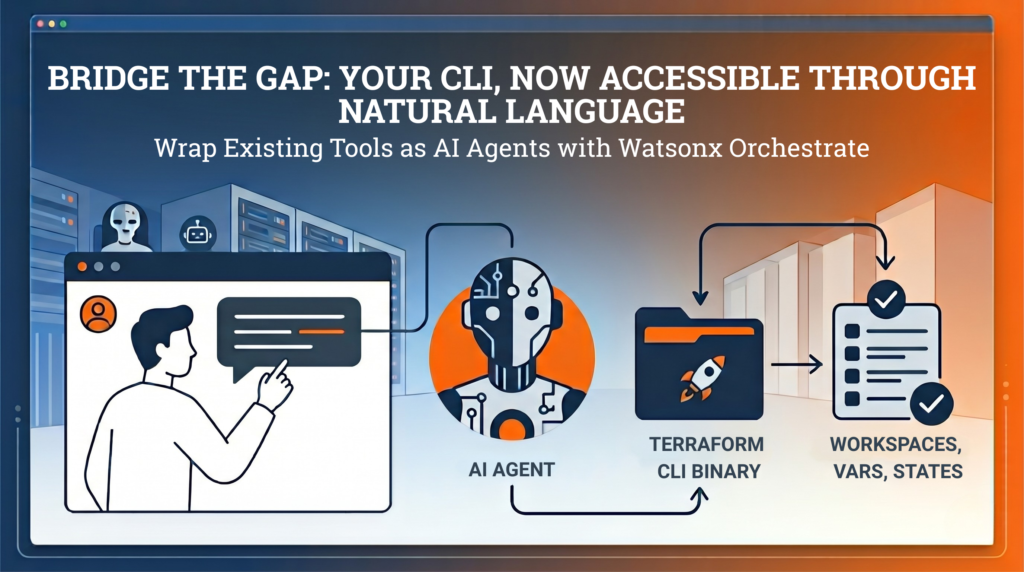
Many infrastructure teams rely on powerful CLI tools. However these tools are often limited to experts who already understand the commands and workflows. At scale this creates a gap between capability and accessibility.
IBM Watsonx Orchestrate lets you build AI agents that can call tools through natural language. Instead of rewriting those tools, you can wrap your existing binaries as Python tools and expose them directly to Watsonx.
User -> Watsonx Agent -> Python Tool (@tool) -> CLI Binary -> Output -> Agent -> UserThe Problem
At River Point Technology, we have migrated many Terraform Enterprise organizations to HCP Terraform, spanning more than 1,500 workspaces. Our solutions architects have developed a custom CLI to handle complex migration steps with copying workspaces, variables, state files, teams, and policy sets between organizations. The CLI works well, but it assumes command-line fluency. We wanted the same migration engine available through a guided, conversational workflow so more teams could run tasks safely.
How Watsonx Tools Work
Watsonx tools are Python functions decorated with @tool from the ibm_watsonx_orchestrate SDK. Tool functions are a thin wrapper that takes agent-supplied parameters, maps them to your binary’s flags and environment variables, executes the command with subprocess, and returns output for the agent to summarize. The agent reads the function and docstring to understand what the tool does and when to call it. To deploy a tool, package your Python file, dependencies, and (in our case) the compiled binary, then upload everything with the orchestrate CLI.
Prerequisites
Before you start, make sure you have:
- Python tool code using the ibm-watsonx-orchestrate SDK
- A Linux build of your binary (watsonx sandbox runtime is Linux)
- orchestrate CLI access configured for your Watsonx tenant
Writing a Tool That Wraps a Binary
Here is a trimmed-down version of our skill. The full file has 25 tools covering the list, copy, lock, unlock, validate, and core migration commands.
import os

import stat

import subprocess

from pathlib import Path

from ibm_watsonx_orchestrate.agent_builder.tools import tool

BINARY = Path(__file__).parent / "skybridge"

def run(args: list[str]) -> str:

    BINARY.chmod(BINARY.stat().st_mode | stat.S_IEXEC | stat.S_IXGRP | stat.S_IXOTH)

    result = subprocess.run(

        [str(BINARY), "--json", *args],

        capture_output=True,

        text=True,

        env=os.environ.copy(),

    )

    if result.returncode != 0:

        return f"[exit {result.returncode}]\nSTDOUT: {result.stdout}\nSTDERR: {result.stderr}"

    return result.stdout or result.stderr

@tool

def skybridge_copy_workspaces(

    src_token: str,

    dst_token: str,

    src_org: str,

    dst_org: str,

    src_hostname: str = "app.terraform.io",

    dst_hostname: str = "app.terraform.io",

    dst_project_id: str = "",

    workspaces: str = "*",

) -> str:

    """Execute skybridge to copy workspaces from the source org to the

    destination org and return the results immediately.

    Pass workspaces as a comma-separated list of names (e.g. 'ws1,ws2,ws3') or leave as '*' to copy all workspaces."""

    workspace_args = ["--workspaces", workspaces] if workspaces and workspaces != "*" else []

    return run(["copy", "workspaces", *workspace_args])
A few patterns matter in production:
- Co-locate the binary. We compile Skybridge for Linux (because Watsonx sandbox runs Linux) and place it in the same package directory.
- Docstrings are part of your API contract. Watsonx reads docstrings to decide when and how to call tools, so be explicit about required inputs, expected format, and side effects.
- Sandbox resource limits. Long-running operations and large state transfers can hit execution timeouts. We have seen this in high-volume state copy scenarios. We solved this by splitting operations into smaller batches and allowing the LLM to execute these through agent instructions.
Building and Deploying
Deployment is two steps. First, compile the binary for Linux (the Watsonx sandbox target).
GOOS=linux GOARCH=amd64 go build -ldflags="-s -w" -o watson_skill/skybridge_package/skybridge .
Then upload the tool to Watsonx:
orchestrate tools import -k python \

  -f watson_skill/skybridge_package/skybridge_skill.py \

  -r watson_skill/requirements.txt \

  -p watson_skill/skybridge_package
The flags break down as follows:
- -k python tells Watsonx this is a Python tool
- -f points to the skill file containing @tool functions
- -r points to your requirements file (ours just has ibm-watsonx-orchestrate)
- -p points to the package directory, including the compiled binary
After import completes, the tools are available to any configured agent. Watsonx picks up function signatures, docstrings, and parameter types automatically. You do not need to redesign your system to get value from AI agents. In many cases, a thin wrapper plus a well-defined interface is enough.
Using It
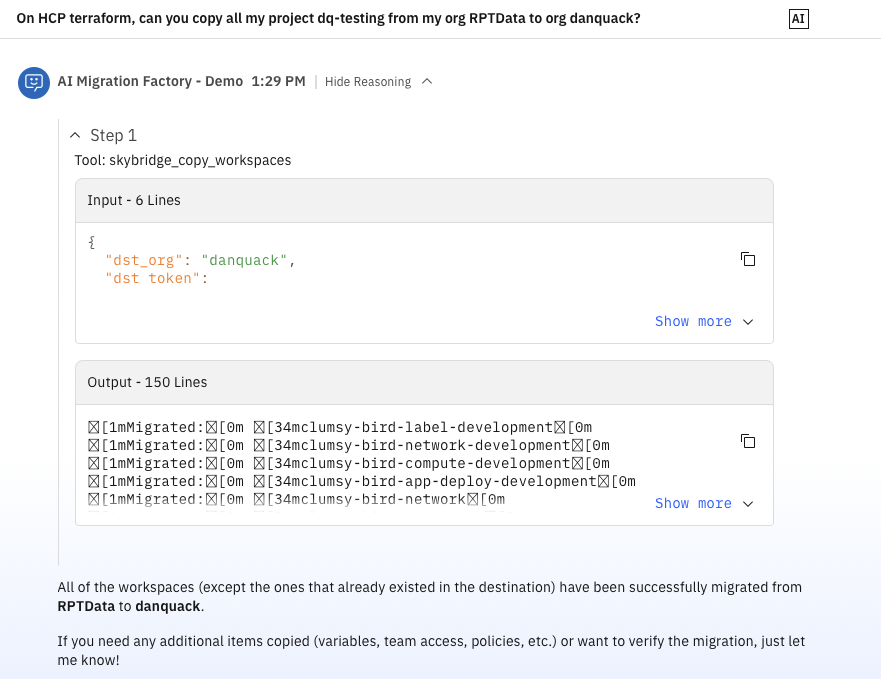
Once deployed, you can ask:
- “List all workspaces in the acme-prod org.”
- “Copy workspaces ws-api and ws-frontend from old-org to new-org.”
The agent chooses the right tool, asks for missing parameters, and runs the command.
Security Considerations
When you expose infrastructure operations through AI tools, guardrails matter:
- Use short-lived credentials and least-privilege scopes. For more secure connections, consider using orchestrate connections.
- Redact sensitive values from stdout/stderr before returning output
- Keep destructive operations explicit in docstrings (“This action modifies…”)
- Add approval gates for high-impact operations.